• Guest, Help The DPF Community Thrive - Join Our Donation Drive Today!

    We're launching a special DPF Donation Drive to ensure our beloved forum continues to flourish. Your support is vital in helping us cover essential server costs and keep our community running smoothly — This is more than just a donation; it's an investment in the future of our community.

    Join us in this crucial drive and let's ensure our forum remains a vibrant and dynamic place for everyone.

    Please visit the DPF Donation Drive Thread for details and instructions on how you can make your donation today!
  • 🎄The DPF 15th Anniversary Holiday Giveaway is on! Head on over to our Giveaways Page for details on how to enter.
  • Vote on the design for the DPF 15th Anniversary Commemorative Pin! Cast your vote in our poll for your favorite design before December 1st!

GUIDE Editing Custom User Titles

Forum Guide: Customizing Your User Title

If you've ever wondered what the text is below your username, it's a User Title, and it's completely customizable!
Custom User Titles add an extra bit of personalization to your posts and can be changed at any time.
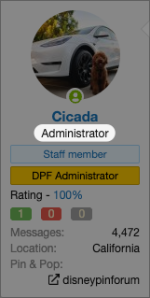
1762930868407.png

Here's a step-by-step guide to help you customize your User Title:​


In the top right corner of any Disney Pin Forum page, click your avatar/username to bring up your account menu, and click on "Account details"
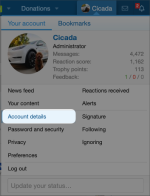
1762931015650.png

In this text box, type what you want your new User Title to say:
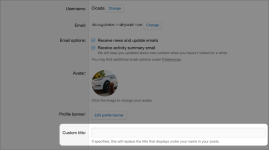
1762931108660.png

Scroll down and click 1762931175205.png.

That's it! Your new User Title will now appear in your posts and profile!

Happy Posting!
-The DPF Team
 
Back
Top