PIN & POP PIN & POP Site Announcements & Ideas

Thank you thank you thank you!It's on my list


Thank you thank you thank you!It's on my list


What do you do with wacky shapes like this?View attachment 22619
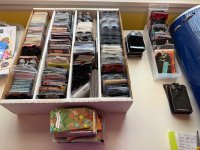
For fun, this is phase 1 of my card / SKU project. The box and the stack in front is completed, identified, in my personal inventory “does it have a backer card” updated. As well as SKUs entered and verified in Pin & Pop. I went through over 2 packs of 500 Post-It Page Markers. So it’s about 1100 cards.
The little stack in the back are cards that I acquired somehow without owning the pin.
The tray are cards for pins not in Pin & Pop yet.
The small stack in front of the tray are cards I could not identify via P&P, MPC or PinPics. I think I can probably figure out some of them on a second pass because they should go with a specific series. For those I can use Worthpoint or EBay photos to match them up.
I have a shoebox full of Disney Store Series cards. Which shouldn’t be too hard outside of updating my personal inventory fields.
Phase 2 will take a lot longer. All the pins still on original cards and in various temporary storage and not permanent homes (bags, frames).
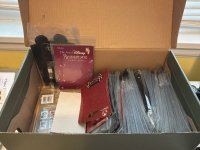
Well, I don’t have a lot of wacky shapes, thank goodness. I don’t know if you can see the cards that are perpendicular to the main group of cards, but those tend to be longer or oddly shaped. Also, I have that shoebox I mentioned.What do you do with wacky shapes like this?

@hopemax you can now customize what columns you want to see in the table view (i.e., SKU and Edition) and it will persist to all pin table views. Let me know if that works for you.The last week or so, I have been working through identifying my baseball card box full of backer cards. This is due to Pinpics saying they're removing SKUs in September *sigh*. This means I've been doing *a lot* of searching, editing and fixing errors. It would be nice if the Series Table View page included the SKU in the empty space next to the Title (Price too) and I'm not sure Series Name is needed next to each pin in the Series View since it already listed twice on the page. Also, if the Rarity also displayed the Edition Size beneath the designation. I'm trying to work through hundreds of cards, and each extra click, and necessary scrolling adds up. Being able to view this information in Series View would make it so much faster to figure out which pins are missing SKUs, have wrong SKUs, have partial SKUs and same for LE size. You can tell when people have used the "Add Similar" button and apparently thought all the Series had the same LE but they actually don't. Anyway, it would be so much easier to identify and fix whole Series at one time vs having to click through to each individual listing to verify info.
Nice! I know someone (I think it was @Randakinskywalker ) had requested a way to mark if a pin has a backer card and, if so, mark the basic shape of the card. ... the first would be easier to do 🙂View attachment 22619
For fun, this is phase 1 of my card / SKU project. The box and the stack in front is completed, identified, in my personal inventory “does it have a backer card” updated. As well as SKUs entered and verified in Pin & Pop. I went through over 2 packs of 500 Post-It Page Markers. So it’s about 1100 cards.
The little stack in the back are cards that I acquired somehow without owning the pin.
The tray are cards for pins not in Pin & Pop yet.
The small stack in front of the tray are cards I could not identify via P&P, MPC or PinPics. I think I can probably figure out some of them on a second pass because they should go with a specific series. For those I can use Worthpoint or EBay photos to match them up.
I have a shoebox full of Disney Store Series cards. Which shouldn’t be too hard outside of updating my personal inventory fields.
Phase 2 will take a lot longer. All the pins still on original cards and in various temporary storage and not permanent homes (bags, frames).
This rocks so hard.@hopemax you can now customize what columns you want to see in the table view (i.e., SKU and Edition) and it will persist to all pin table views. Let me know if that works for you.
Can you not edit listings anymore?So for an example of how great this is working (unless you’re a Mod, maybe 🤣 ) I just went through the Countdown to the Millennium Disney Store set. Expected it to be straightforward, these are old well documented pins. Still had to make like 5 Reports with typos or outright wrong SKUs. Not sure I would have caught all of them, if it wasn’t for the new Table View.
Some things you can edit like Title, Date, Edition Size. But the SKU and FAC field you can add a new one, but you can't edit or remove wrong info.Can you not edit listings anymore?
On the bottom of the profile page at the "where I trade", etc or someplace else a link to a users DPF user name.
That might make pre-emptive strikes for trades a little easier as they can be done via DM


Just an FYI on this, if you're talking about regular letter envelopes and not bubble mailers, this isn't an issue with the USPS. It's the selected postage and mailing method that's the issue. Regular letter envelopes will almost always be sent through the automated letter sorters by default. The letter sorters will eat up and tear apart letters that have big bumps in them, as they're made for flat shapes, not unusual ones. Letters are wound around wheels on a belt at a high speed, and you would have to pay a non-machinable fee to avoid it being fed into the automated sorters, and even then it's still likely to rip open just because of how flimsy regular envelopes are. There's a reason bubble mailers are the shipping standard in the community. I'd caution against regular envelopes as you'll probably continue to lose pins, which will likely be more costly than just paying for package shipping.I've mailed off single pins for second chance pins, put then in an envelope w/ first class postage- one of them arrived but it was an open envelope with nothing inside and then the 2nd one hasn't shown up yet, so am guessing something else with the USPS as I am not paying for tracking for one pin due to the strict 2 week rule that PnP has in place for sending pins in.

What a beautiful wonderful magical surprise on a rough D23 day!
Thanks @Chris Nickols

Sent from my iPhone using Tapatalk
Yes haha, that was me. If we did the basic shape of the cards, I'd assume it would only be for the standard re-used backer cards, and the Custom Card would just be the one option, not one for every Custom Card. I need to go on a mission to record all the cards that have been mass-used over the years.Nice! I know someone (I think it was @Randakinskywalker ) had requested a way to mark if a pin has a backer card and, if so, mark the basic shape of the card. ... the first would be easier to do 🙂

Hmm. I haven't heard anything about this but I'll tag @Chris Nickols to see if he can clarify. I know that he said the site has been experiencing a lot of scraping attacks in the past year, so it unfortunately may have been a necessary security measure to prevent unnecessary strain on the site.I don't trade on Pin & Pop, but I've been using it as a reference source (especially since so many people here use it to list both their traders & in search of lists). When I tried checking it lately, I realized I can no longer see the 'additional' pictures of pins without having a login . . . including the comparison pictures to tell if a pin is fake or not.
Is this a permanent 'update'? It's just making it harder for people to trade genuine pins. . . .
Thank you.Hmm. I haven't heard anything about this but I'll tag @Chris Nickols to see if he can clarify. I know that he said the site has been experiencing a lot of scraping attacks in the past year, so it unfortunately may have been a necessary security measure to prevent unnecessary strain on the site.
If it helps, a Pin and Pop account is completely free for all database access (there are some trade statistics only available for VIP members like what a pin has traded for in the Arcades in the past) and there's no obligation to join the trading side.

yup, i'm dealing with the same issue...At least one of my canceled trades still has this big “traded” stamp on it. I’m afraid that means I won’t be able to trade it in the arcade.

Sent from my iPhone using Tapatalk